


Real estate work depends on a lot of paperwork. Every day, contracts, lease files, escrow forms, inspection reports, and other things pile up. Many teams still handle these documents manually, which is one of the main reasons files get lost or delayed.
A report from Propstream shows that paperwork management is a major workflow issue for many real estate professionals. They spend an average of 9.4 hours on paperwork. This important time could have been spent on other tasks.
Most of the usual issues are fixed by digitizing these documents. Properly storing files, making them easy to find, and scanning them all make the process faster and cleaner.
You don’t waste time searching for a missing form or dealing with damaged copies. This guide explains what document digitization means in real estate and how to digitize real estate paper documents quickly and accurately. But first, we will understand the basics.
What is Document Digitization?
Digitizing documents refers to changing paper files into digital documents that you can easily store and search on digital devices. Or in other words, digitizing is converting content trapped in the physical papers or scanned documents into digital text that machines can read and edit.
In real estate, such conversion usually includes scanning contracts, lease agreements, escrow documents, title papers, inspection reports, and any other property records that are part of a deal. Instead of keeping everything in physical folders, the paperwork is converted into eDocuments that live in a secure digital archive. For real estate teams, digitization is basically the first step from paper to digital workflow.
How to Convert Real Estate Paper Files to Digital Documents
There are two methods to digitize documents. One is to type in the text manually using a keyboard. You simply need a text editor like MS Word or Google Docs for this. But this process needs an entire team because it is a hectic and time-consuming job. The second method is extracting text using online OCR tools. This method is very quick and easy. You can extract text from a pile of papers in less time and with better accuracy than extracting it manually.
As a report from DocuClipper says:
“Typically, automated data entry boasts an accuracy rate of 99.959% to 99.99%. In contrast, the accuracy rate for human data entry ranges from 96% to 99%.”
To simplify text extraction using the OCR tool, we will explain each step.
Organize Your Documents Properly
At first, real estate teams should separate documents by type. Many mistakes happen when documents are scanned in the wrong order or stored under the wrong property. You can arrange contracts and agreements in one file. Similarly, you can create a new set of closing documents and inspection reports.
A simple review of each folder also helps catch missing forms early. Organized documents also speed up later steps like OCR text extraction, naming, and storing the final eDocuments in a digital archive. When paperwork is sorted the right way at the start, the entire workflow becomes smoother and reduces errors in property record management.
Scan All the Papers Clearly
After organizing the documents, the next thing real estate teams should do is scan everything one by one. It sounds simple, but a lot of issues start here because many property documents are old, folded, or mixed with handwritten notes.
If a page comes out blurry or dark, the OCR tool will not pick the text correctly, and the digital document will become difficult to use later.
Most people in real estate rely on whatever scanner they have in the office, while some use phone scanning apps when they are in the field. You can choose either option as long as you look at the preview before saving the file. A clean scan makes the whole digitization process easier. When the scanned copy looks clear, the workflow for document management becomes smoother.
Extract Text from the Scanned Files
Once your documents are scanned properly, the next step is to pull the actual text out of those images. A lot of OCR-based text extraction tools are available online. Choosing the right text extraction tool is, however, a critical decision because the quality of extracted text mostly depends on the tool’s accuracy. Consequently, a good approach is to try some tools and evaluate the quality of their output.
Data privacy is also a major issue. If you need to extract data from sensitive documents, you should opt for a tool that clearly states its data privacy policies.
Another important thing is the output format. If you are working with just text, a simple OCR tool can work there. But if you extract data from an image containing text and tables, for example, a table with columns for property details (address, size, features), financial information (price, mortgage, taxes), and transaction specifics (dates, agents, status), the tool may mix up the text and tabular data. Therefore, you can use a tool that can specifically extract text from such kinds of documents and provide output in tabular form.
For example, the following image containing sales price info of different properties was uploaded into such a tool:
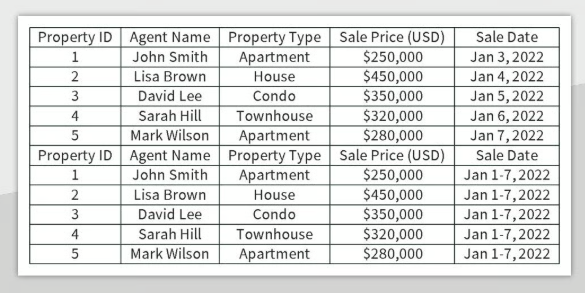
The tool did a decent job of extracting the information and putting it into the spreadsheet format accurately.
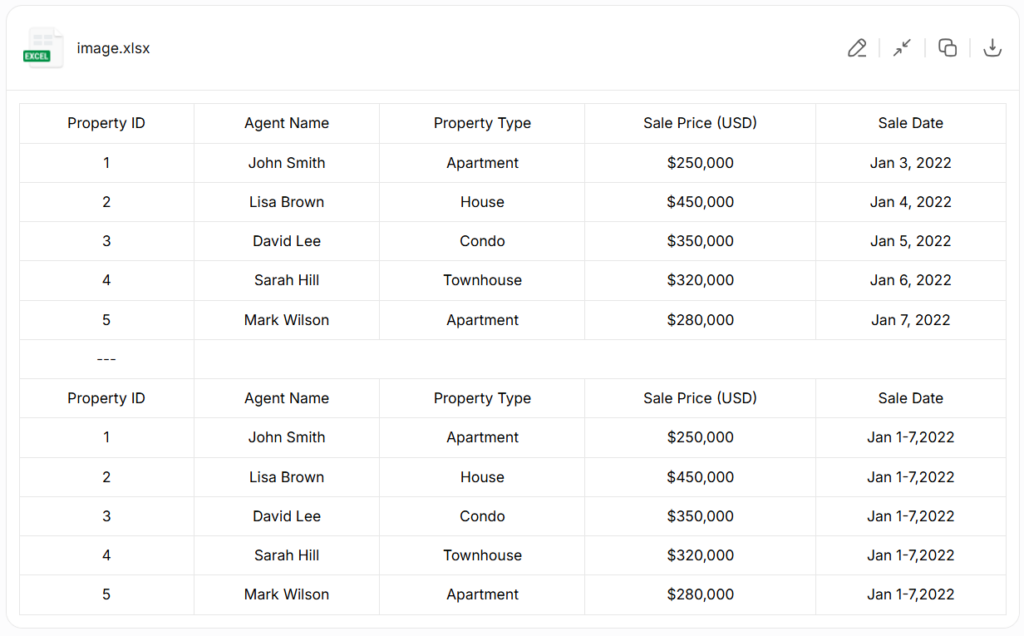
(Tool Link: https://www.jpgtotext.com/jpg-to-excel)
Create a Simple Folder Structure for Every Property
After making digital documents, the next thing that helps a lot is creating a clean folder structure for every property. Real estate paperwork usually grows fast, and without a simple system, documents get mixed up.
This simple setup saves time when you want to find something later. Instead of checking old email threads or digging through random PDFs, everything stays grouped under the right property. A clear folder structure makes the entire record management process easier for your team, especially when multiple people work on the same transaction.
Store Everything Safely in Cloud Storage
This step is optional. You can save your data on physical devices like your laptop or an external drive. But there are chances of damaging or losing the data. So a good approach is putting them somewhere safe so the documents don’t get lost again. Most real estate teams use cloud storage because property records, inspection reports, closing papers, and scanned contracts stay accessible even when people work from different locations.
Pick a storage option that allows simple folder control, version history, and easy search. Many teams use Google Drive, Dropbox, and OneDrive. Others prefer to use a document management system made for real estate so that big files and eDocuments stay organized and the workflow doesn’t slow down.
Benefits of Digitizing Real Estate Paper Documents
Faster Access to Property Records
Teams in real estate spend less time sifting through cabinets when papers move from physical folders to digital formats. When stored in the right document management system, digital documents load in seconds.
This speeds up property viewings, client calls, and quick verification tasks. It makes closings go faster by not having to wait for the missing file. This efficiency also simplifies internal cooperation as agents, brokers, or assistants can open the same eDocuments from any device.
Lower Risk of Losing Important Paperwork
Physical papers get damaged fast. Environmental conditions and frequent handling cause the paper to distort. Also, storing paper files takes up much space in the office. When documents are digitized and stored as searchable files, there is no risk of paper damage.
Cloud backups add another layer of protection. If a laptop fails or someone deletes something by mistake, the digital archive still keeps earlier versions safe for the team.
Better Workflow and File Tracking
Digitization improves how real estate paperwork moves through the workflow. Once documents become searchable e-documents, it becomes clear who uploaded them, when they were scanned, and what property they belong to.
A team can track contracts, add metadata, and check the status of each deal without depending on anyone to bring the file from the desk. It also reduces the chance of duplication because everyone sees the same digital version.
Cloud based record management helps agents update disclosures, upload new forms, and share files with clients without emailing multiple copies, which keeps the paperwork cleaner and easier to follow.
Wrapping it Up
Digitizing real estate documents gets rid of a lot of the problems that come with paper files. When contracts and closing papers stay in a digital archive, teams don’t waste time fixing missing pages or sorting damaged copies. Organizing documents, scanning them clearly, extracting text, and storing everything in cloud storage builds a workflow that is easy to manage every day.